How a Browser Works: From URL to Pixels (Beginner Guide)
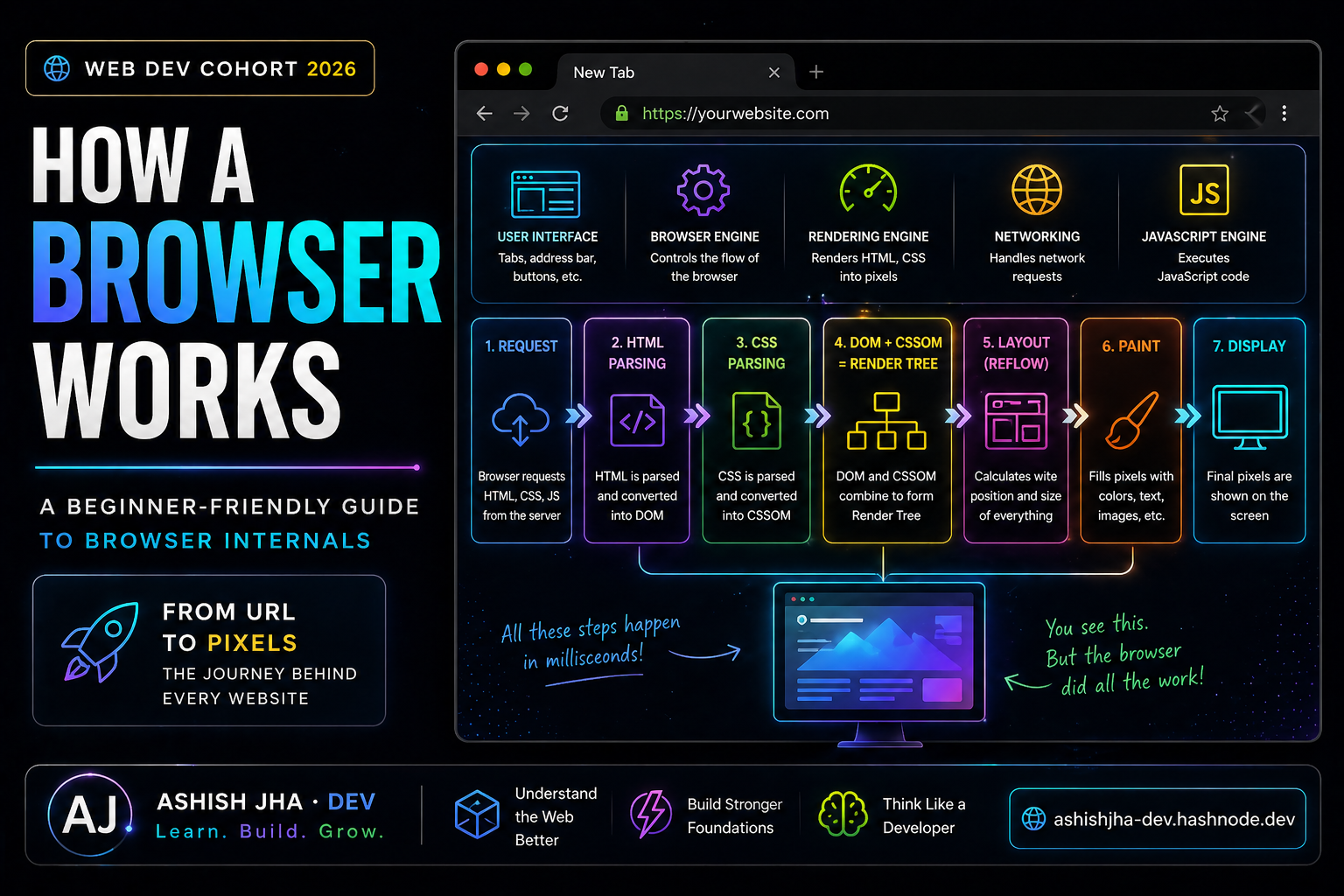
You type a URL…
Press Enter…
And a full website appears.
But what actually happens in between?
It’s not magic. It’s a series of steps working together very fast.
Let’s break it down — simply.
What is a Browser (Really)?
A browser is not just something that “opens websites”.
It is a system of components that:
Fetch data from the internet
Understand HTML, CSS, JS
Convert it into a visual page
Main Parts of a Browser (High-Level)
Think of a browser like a team:
User Interface → What you see (tabs, URL bar)
Browser Engine → Controls everything
Rendering Engine → Displays content
Networking → Fetches data
JavaScript Engine → Runs JS
User Interface (UI)
This is the visible part:
Address bar
Back/forward buttons
Tabs
This is where you interact.
Browser Engine vs Rendering Engine
Simple difference:
Browser Engine → Manages overall flow
Rendering Engine → Converts code → visuals
Think:
Browser engine = manager Rendering engine = worker
Step 1: Networking (Fetching Data)
When you press Enter:
Browser sends a request to server
Server returns:
HTML
CSS
JavaScript
Step 2: HTML → DOM
Browser reads HTML and converts it into a structure:
DOM (Document Object Model)
<body>
  <h1>Hello</h1>
</body>
Becomes:
body
 └── h1
Like a tree structure
Step 3: CSS → CSSOM
CSS is also parsed into a structure:
CSSOM (CSS Object Model)
h1 {
  color: red;
}
Step 4: DOM + CSSOM → Render Tree
Browser combines both:
DOM (structure), CSSOM (styles)
→ Creates Render Tree
Step 5: Layout
Browser calculates:
Position
Size
Spacing
Where everything should appear
Step 6: Paint
Browser fills:
Colors
Text
Images
Step 7: Display
Finally:
Pixels are shown on screen
Full Flow (Important)
URL → Request → HTML/CSS/JS
→ DOM + CSSOM
→ Render Tree
→ Layout
→ Paint
→ Screen
What is Parsing? (Simple Example)
Parsing = breaking something into meaning
Example:
2 + 3 * 4
Browser understands structure before solving
Same with HTML/CSS.
Final Thought
You don’t need to memorize everything.
Just understand the flow
Once you get this:
Web development starts making sense.


